Killswitch SMS Opt-In Flow
Documentation for A2P 10DLC Campaign Registration
User Consent Flow
Users explicitly opt-in to SMS notifications through our Settings page. The opt-in process requires users to:
- Navigate to Settings → Notifications
- Enter their phone number in E.164 format
- Toggle the "Deadman Switch SMS Reminders" option to enable
- Review and acknowledge the consent notice
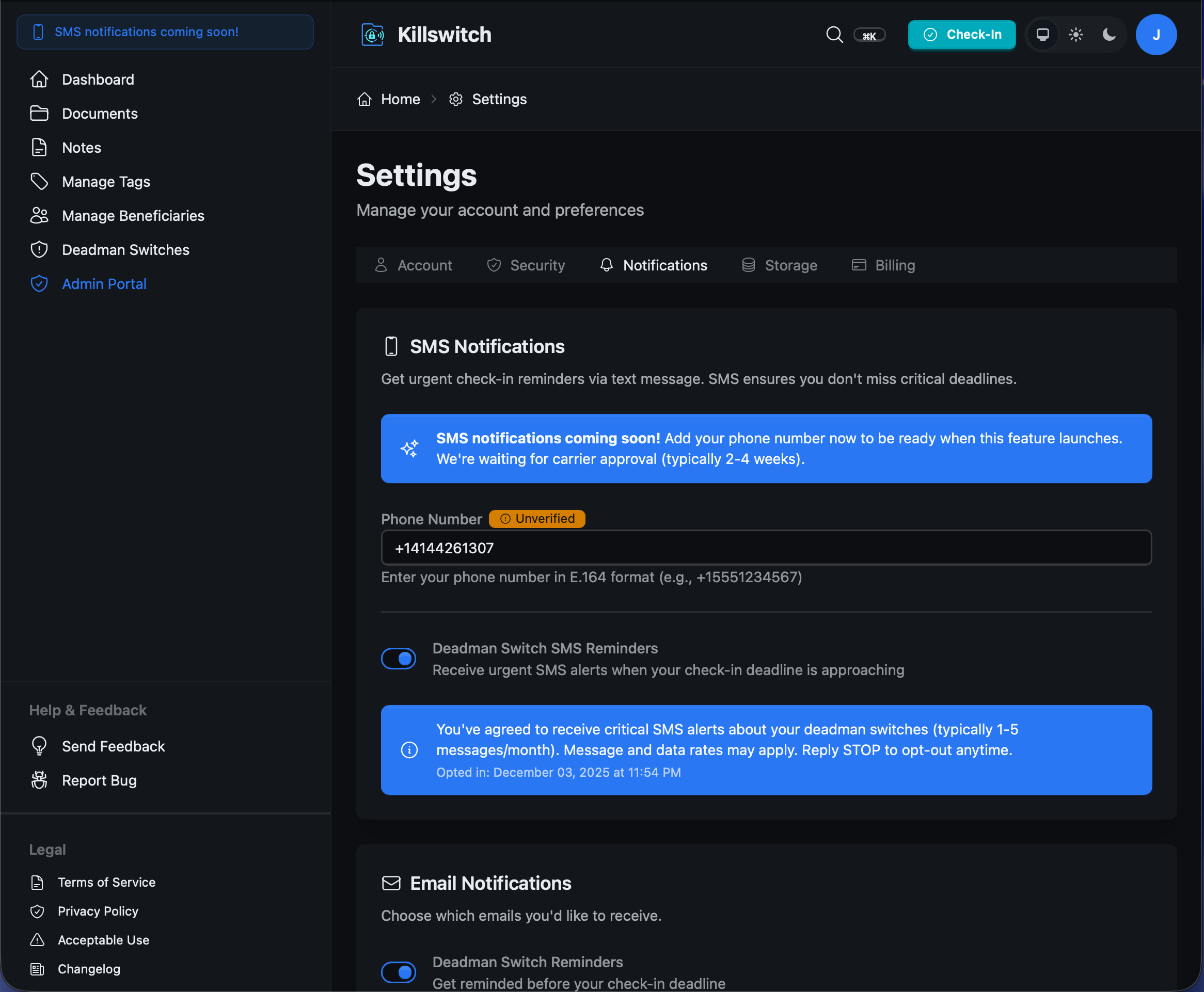
Consent Language Shown to Users:
"You've agreed to receive critical SMS alerts about your deadman switches (typically 1-5 messages/month). Message and data rates may apply. Reply STOP to opt-out anytime."
Message Types
Users who opt-in will receive the following types of messages:
-
1
Check-in Reminders
Alerts when their deadman switch check-in deadline is approaching
-
2
Urgent Deadline Warnings
Final warnings before automatic file transfer to beneficiaries
Opt-Out Instructions
Users can opt-out at any time through:
- Replying STOP to any SMS message
- Disabling the toggle in Settings → Notifications
- Removing their phone number from their account
Message Frequency
Users typically receive 1-5 messages per month, depending on their deadman switch configuration and check-in frequency. Messages are only sent when action is required (approaching deadlines).
For questions about our SMS program, contact hello@killswitch.app